
This guide provides detailed instructions for operating the SYT series rectifier power supplies. Follow these steps carefully to ensure safe and efficient operation of your equipment.
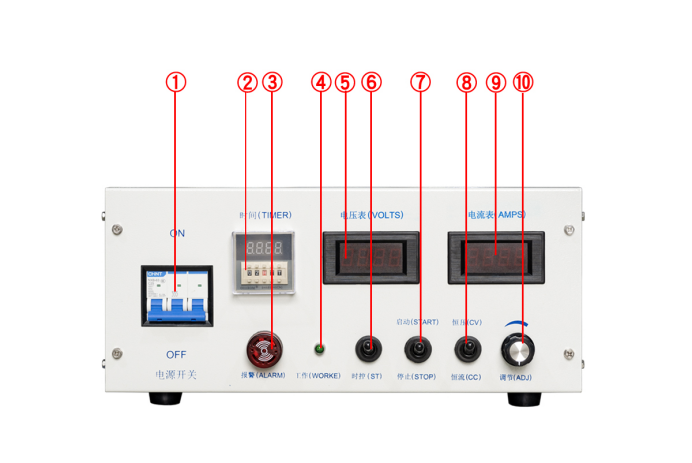
SYT Series Rectifier Control Panel
1. Starting and Stopping
- First, connect the rectifier power supply. Toggle switch ① upward to turn on the rectifier power, and toggle switch ① downward to turn off the rectifier power.
- The rectifier is controlled to start or stop via the ⑦ "Start/Stop" switch. Toggling ⑦ upward puts it in the "Running" state, and the working indicator light ④ stays on when the rectifier is running.
- Toggling ⑦ downward stops the rectifier.
- During operation, the current and voltage can be adjusted at any time using the adjustment knob ⑩.
Operating Procedure Demonstration
Video: SYT Rectifier Operation Guide
2. Mode Selection
- Select either "Constant Voltage (CV)" or "Constant Current (CC)" mode according to usage requirements.
- Toggling ⑧ upward selects the "Constant Voltage (CV)" mode.
- Toggling ⑧ downward selects the "Constant Current (CC)" mode.
3. Voltage/Current Adjustment
- Constant Voltage Mode: Rotate the adjustment knob ⑩. Turn it clockwise to increase the voltage, and counterclockwise to decrease the voltage.
- Constant Current Mode: Rotate the current adjustment knob ⑩. Turn it clockwise to increase the current, and counterclockwise to decrease the current.
Important Note
Adjust slowly to ensure stable values. Stop adjusting once the target value is reached.
4. Time Setting
- Set the working time using the buttons on timer ②, which supports setting in hours, minutes, and seconds.
- For precise control, you can set it in 1-second increments.
- When operation starts, timer ② automatically counts down.
- When the countdown reaches 0, the red light of the alarm buzzer ③ lights up with an alarm sound, and the device automatically stops output, with the output current and voltage becoming 0.
Safety Reminder
Ensure the rectifier is in the stopped state before turning off the power.
Key Takeaways:
- Follow proper startup and shutdown procedures to extend equipment life
- Select the appropriate mode (CV or CC) for your application
- Make adjustments slowly and precisely for optimal results
- Utilize timer functionality for automated operation cycles